2.4. “Communication” Page
The “Communication” configuration page, shown below in Fig. 11, allows for the configuration of Ethernet and the controller’s bus systems. The following sections describe the various options available on this page and their recommended settings for our gantry robot configuration.
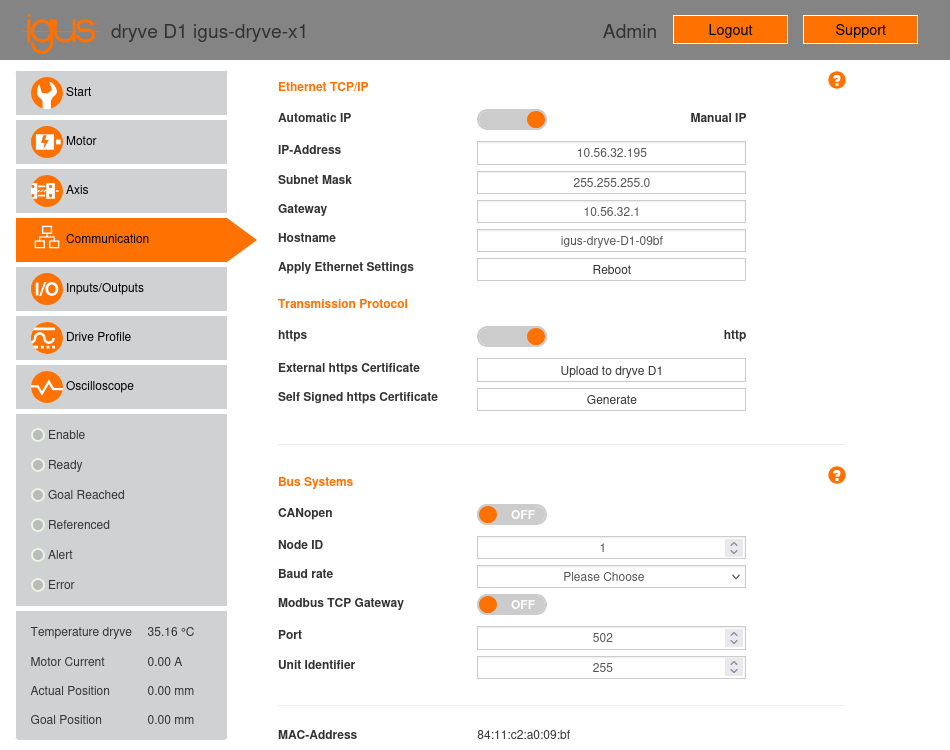
Fig. 11 “Communication” configuration page of the X1 motor controller.
2.4.1. Ethernet TCP/IP
This section allows for configuring TCP/IP connection parameters: IP address, subnet mask, gateway, and hostname. After setting these parameters, you must click the “Reload” button to apply the changes.
In our gantry robot setup, these parameters were manually configured to the values shown below in Table 4. The controllers were connected to a PC via a switch. The parameters were configured to enable connectivity to the local network.
Parameter |
Value (X1) |
Value (X2) |
Value (Y) |
Value (Z) |
|---|---|---|---|---|
IP-Address |
10.56.32.195 |
10.56.32.196 |
10.56.32.197 |
10.56.32.198 |
Subnet Mask |
255.255.255.0 |
255.255.255.0 |
255.255.255.0 |
255.255.255.0 |
Gateway |
10.56.32.1 |
10.56.32.1 |
10.56.32.1 |
10.56.32.1 |
Hostname |
igus-dryve-D1-09bf |
igus-dryve-D1-098a |
igus-dryve-D1-0979 |
igus-dryve-D1-09c3 |
2.4.2. Transmission Protocol
This section allows you to select whether communication with the dryve D1 controller’s web server should be via an unencrypted HTTP connection or an encrypted HTTPS connection. For an HTTPS connection, an external certificate can be provided, or a self-signed certificate can be generated.
In our gantry robot setup, the option to use an unencrypted HTTP connection was selected.
2.4.3. Bus Systems
The controller is equipped with two bus systems, CANopen and Modbus, which enable communication with the controller and control of motor movement. In our case, we will not use either of these systems, as we will control the motor using the inputs and outputs of connectors X2 (digital inputs), X3 (digital outputs), and X4 (analog inputs). Therefore, the “CANopen” and “Modbus TCP Gateway” options have been left at their default setting of “OFF.”