3.3. System Latency Tuning
The maximum system latency can depend on various factors such as hardware, firmware configuration, system load, and hardware interrupt handling. If the maximum system latency is too high, adjustments to the system configuration will be necessary to reduce it. Various sources, including official documentation, guides, and talks, provide detailed guidelines for optimizing the performance of real-time Linux systems [RedHatInc23a, Bar23, Cri22, Koz23]. The LinuxCNC user manual [lin23] also suggests several potential adjustments to reduce latency, which are detailed in the following sections.
For our testbed setup, we used a Lenovo T430s laptop equipped with an Intel Core i5-3320M CPU and running Debian 12. Additionally, we only considered the use of a slow thread with a 1 ms period. In this case, the latency values obtained, as shown in Figures 15, 17, and 16, were sufficiently low without requiring any further modifications. However, note that for other hardware, even with the same operating system, the latency values could be higher. If the system latency becomes too high during LinuxCNC operation, a warning similar to Fig. 18 would appear.
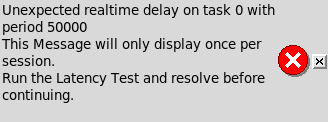
Fig. 18 LinuxCNC warning for unexpected latency values.
3.3.1. Firmware Settings
System firmware such as the BIOS or UEFI, can significantly impact system latency. This impact varies depending on the hardware manufacturer and the quality of the provided firmware. Firmware is responsible for initializing and configuring system hardware before the operating system loads. If the firmware is not properly configured to provide accurate timing or does not adequately manage interrupts and hardware devices, it can contribute to increased system latency.
The firmware settings recommended in the LinuxCNC user manual [lin23] that can help reduce latency include the following:
Disable APM, ACPI, and other power-saving functions, including all suspension related features and CPU frequency scaling.
Disable CPU “turbo” mode.
Disable CPU simultaneous multithreading technology, e.g., Intel’s Hyper-Threading technology.
Disable or limit SMIs (System Management Interrupts).
Disable unused hardware.
3.3.2. Linux Settings
Linux offers various options that can help improve latency. Specifically, for our case, we will consider kernel boot command-line parameters and runtime parameters configured via the sysctl command. These parameters are described below.
3.3.2.1. Kernel Boot Command-Line Parameters
A comprehensive list of parameters is available at https://docs.kernel.org/admin-guide/kernel-parameters.html. In Debian, command-line parameters can be specified in the following ways:
In the GRUB bootloader, you can press a key (often
e) to edit the selected boot entry and append the parameters to the end of the line. Once added, you can boot the system by pressingF10orCtrl+X.To persistently specify parameters, edit the
/etc/default/grubfile, adding the parameters to theGRUB_CMDLINE_LINUX_DEFAULTvariable, and then run theupdate-grubcommand. For more information about GRUB configuration variables, refer to the corresponding manual page at https://www.gnu.org/software/grub/manual/grub/html_node/Simple-configuration.html.
For latency optimization, the most relevant parameters, as suggested in the LinuxCNC user manual [lin23], are:
isolcpus: A list of CPUs that will be isolated from balancing and scheduling algorithms. This prevents most system processes from using the specified CPUs, thereby making more CPU time available for LinuxCNC.irqaffinity: A list of CPUs to set as the default IRQ affinity mask. This selects the CPUs that will handle interrupts, ensuring that the remaining CPUs do not have to perform this task.rcu_nocbs: A list of CPUs whose RCU callbacks will be executed on other CPUs.[Wikipediacontributors23c, RedHatInc23b].rcu_nocb_poll: This option periodically wakes up RCU callback execution threads using a timer to check for callbacks to execute. Without this option, the CPUs specified inrcu_nocbsare responsible for waking up the threads that execute RCU callbacks [RedHatInc23b]. This option improves the real-time responsiveness of the CPUs listed inrcu_nocbsby freeing them from the need to wake up their corresponding threads.nohz_full: A list of CPUs that will cease receiving timing ticks when only one task is executing. As a result, these CPUs can dedicate more time to executing applications and less time to handling interrupts and context switching. The CPUs in this list will have their RCU callbacks transferred to other CPUs, as if they had been specified with thercu_nocbsoption.
To determine the number of processors in your system, you can use either the nproc command or cat /proc/cpuinfo. For instance, in a system with 4 CPUs, if you wish to isolate 3 CPUs from disturbances, you can use the following parameters:
isolcpus=1-3 nohz_full=1-3 rcu_nocb_poll irqaffinity=0
3.3.2.2. Runtime Parameters using sysctl
The sysctl command is used to modify kernel parameters at runtime. The available parameters are those listed in /proc/sys/. For latency, the LinuxCNC user manual [lin23] suggests the following parameter:
sysctl.kernel.sched_rt_runtime_us: This sets a global limit on the maximum CPU time that real-time tasks can consume. Set to -1 to remove the time limit. More information about this parameter can be found at https://www.kernel.org/doc/html/latest/scheduler/sched-rt-group.html.
To persistently set these parameters, they must be added to the /etc/sysctl.conf file or, preferably, to a new file within the /etc/sysctl.d directory. For more information, consult the sysctl.conf manual page.